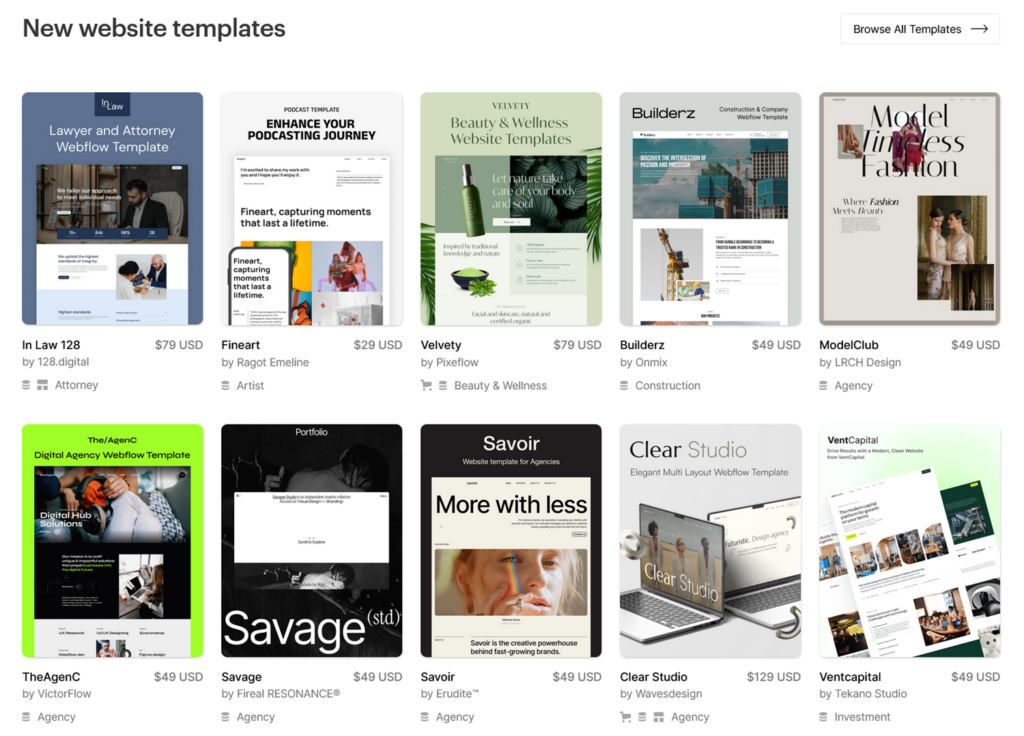
Webflow has emerged as a leading website creation platform, garnering the trust of over 3.5 million designers, marketers, and developers worldwide. This platform facilitates the design, collaboration, and scaling of stunning websites. Known for its versatile website construction and hosting solutions, Webflow boasts an extensive array of integrations and user-friendly yet potent functionalities, all complemented by its commendable customer support service.
Pros
No Need to Code
Easy to Use WYSIWYG website editor
Lots of Integration Options
Optimized Editable Pre-made Templates
Cons
Relatively Expensive Pricing Plans
Limited Plugins Library
Learning Curve
Webflow is a powerful SaaS platform that significantly bridges the gap between coding and design in the realm of website building and hosting. It offers an intuitive, visual editor that allows users to design, build, and launch responsive websites visually, without needing to write code, making it a highly attractive option for designers, marketers, and business owners alike. Here’s a comprehensive review based on its features, usability, performance, support, and pricing.
1. Features
Webflow offers a rich set of features that cater to both beginners and advanced users:
Visual Design and Development: Users can visually design their website while Webflow automatically generates clean, semantic code. This feature is particularly appealing to designers who prefer a visual approach to web development.
CMS Functionality: Webflow includes a fully integrated CMS, enabling users to create and manage dynamic content without the need for a third-party CMS.
E-commerce Integration: It supports building and customizing online stores, providing various e-commerce functionalities directly integrated into the platform.
Responsive Design: The platform ensures that websites are responsive and look great on any device, thanks to its device viewports feature.
Interactions and Animations: Users can add sophisticated interactions and animations to their websites, enhancing the user experience without the need for custom JavaScript.
2. Webflow Templates
Webflow templates are more than just pre-designed layouts; they are a gateway to a powerful designer toolkit. These templates are built on a platform that combines a visually intuitive interface with the robust capabilities of HTML, CSS, and JavaScript. This means users can start with a template and extend it far beyond its initial parameters, thanks to Webflow’s powerful designer tools. From complex interactions to dynamic content, the possibilities are virtually limitless.
In today’s mobile-first environment, responsiveness is not just an option but a necessity. Webflow’s responsive templates ensure that your website performs seamlessly across all devices and screen sizes. These templates are designed to automatically adjust and optimize the layout based on the user’s viewing environment, providing a consistent and engaging user experience no matter how your site is accessed.
One of the standout features of Webflow templates is their customizable nature. Unlike many platforms where templates offer limited modification options, Webflow’s customizable templates allow for deep customization. Every element of a template is editable, giving you the freedom to tweak the design aesthetics to match your brand identity perfectly. From colors and fonts to layout and interactions, you can personalize every detail.
For users looking to get their website up and running quickly without compromising on design quality, Webflow offers easy templates. These templates are designed with simplicity in mind, ensuring a smooth design process even for those with minimal web design experience. Despite their simplicity, these templates are sleek, modern, and fully responsive, ensuring your website is professional and polished.
Keeping pace with the latest design trends is crucial in the digital space. Webflow’s modern templates are crafted by leading designers and are continuously updated to reflect current design aesthetics. Whether you’re looking for a minimalist approach, bold typography, or dynamic visual effects, Webflow’s template collection has something for every taste.
Flexibility is at the core of Webflow’s offering, and its editable templates embody this principle. Every aspect of the template can be customized and edited, giving designers the freedom to iterate and evolve their websites over time. This flexibility encourages continuous improvement and adaptation, ensuring your website can grow and change as your business does.
With an extensive library of templates, Webflow provides design options for virtually any type of project. From e-commerce and business sites to portfolios and blogs, each template is optimized for a specific purpose, ensuring you start with a solid foundation tailored to your needs.
3. Webflow Builder and Code
In the dynamic world of web design and development, the ability to merge intuitive visual design with the raw power of code is a coveted skill. Enter Webflow, a platform that has revolutionized the way designers and developers approach website creation. At the heart of this revolution is the Webflow builder, a tool that combines the simplicity of drag-and-drop design with the flexibility of custom code, empowering users to create professional, responsive websites without compromise.
The Webflow builder stands out for its user-friendly interface, allowing users to construct websites visually. This approach democratizes web design, making it accessible to designers without deep coding knowledge. However, what truly sets Webflow apart is its ability to integrate raw code and advanced marketing tools within this visual framework. Users can toggle webmaster tools, injecting custom code for specific functionalities, analytics, or third-party integrations, bridging the gap between visual design and technical implementation.
Clean Code in Webflow
For those who need more than what the visual builder offers, Webflow provides the capability to add custom code directly into the project. This feature is invaluable for implementing complex features, SEO strategies, and integrating with marketing tools that require precise control over the website’s behavior. The platform supports HTML, CSS, and JavaScript, enabling designers to fine-tune the user experience and aesthetics to their exact specifications.
Moreover, the inclusion of custom code does not mean sacrificing the cleanliness and maintainability of the project. Webflow emphasizes clean code principles, automatically generating neat, structured code from the visual designs. This ensures that websites built with Webflow are not only visually appealing but also optimized for performance and scalability.
Webflow’s interface includes options to toggle webmaster tools, offering users advanced control over their site’s functionality and analytics. Whether it’s integrating Google Analytics for detailed visitor insights or embedding custom widgets, these tools are easily accessible. This integration is seamless, reflecting Webflow’s commitment to providing a comprehensive platform that caters to both designers and marketers.
One of the foundational aspects of Webflow is its commitment to generating clean code from visual designs. This approach has multiple benefits:
Performance: Clean code is optimized for speed and efficiency, ensuring websites load quickly and perform well across all devices.
SEO: Well-structured, semantic code is crucial for SEO. Webflow’s clean code helps improve search engine rankings by making it easier for search engines to understand and index content.
Maintainability: Clean code is easier to understand and maintain, making future updates or customizations less time-consuming and reducing the likelihood of bugs.
Crafting Beautiful Sites and Streamlining Content
In the realm of web design and content management, Webflow stands out as a comprehensive platform that offers an all-encompassing solution for creating, managing, and optimizing websites. Whether it’s for complex multipage sites, high-traffic small business websites, or content search websites, Webflow equips users with the tools and features necessary to build beautiful, responsive sites. With functionalities ranging from site backups to sophisticated content marketing strategies, Webflow ensures that both the aesthetic and operational needs of modern websites are met with precision and efficiency.
Site Management with Site Backups
One of the cornerstone features of Webflow is its site backups capability. This essential feature ensures that creators can save and restore versions of their site, providing a safety net against unwanted changes or data loss. Whether you’re managing beautiful sites on platforms like Hostinger or directly through Webflow, the peace of mind that comes with easy-to-manage backups is invaluable, especially for complex multipage sites that require regular updates and modifications.
Webflow offers an unparalleled level of design freedom, allowing users to create beautiful, custom sites that are both visually appealing and functionally robust. This is particularly beneficial for content search websites and high-traffic small business websites, where the balance between aesthetics, performance, and user experience is critical. With Webflow, designers can tweak page settings, integrate content marketing tools, and manage unlimited products without the constraints found in traditional website builders.
For websites that rely heavily on content to engage and convert visitors, Webflow’s editorial review process and content marketing capabilities provide a solid foundation for success. Content search websites, in particular, benefit from Webflow’s dynamic content system, which allows for easy categorization, searchability, and optimization of content. Moreover, the platform supports complex content strategies, enabling businesses to leverage their content for growth and engagement.
4. E-Commerce Made Easy
E-commerce sites built on Webflow enjoy a range of features designed to enhance the online shopping experience. From unlimited products to free domain options, Webflow caters to e-commerce businesses of all sizes. The platform’s e-commerce tools are integrated seamlessly with its design and content management systems, making it easy to build and manage beautiful, effective online stores. Whether it’s a small boutique or a large online retailer, Webflow provides the scalability and flexibility needed to thrive in the competitive e-commerce landscape.
Webflow goes beyond website building, offering tools and integrations for content marketing, SEO, and analytics. These features ensure that websites not only look great but also perform well in search engines and meet the marketing objectives of the business. The platform’s comprehensive approach to site and content management makes it a powerful ally for businesses looking to establish a strong online presence.
5. Performance and Usability
Webflow scores high on usability. Its drag-and-drop interface is user-friendly, making it accessible for users with varying levels of web development experience. The platform offers a wide range of templates, which can be customized extensively to fit the user’s design requirements. However, there is a learning curve, especially for those aiming to utilize its more advanced features.
Websites built with Webflow are known for their high performance. The platform optimizes images and code to ensure fast loading times, which is crucial for SEO and user experience.
Webflow provides extensive documentation, tutorials, and a responsive customer support team. The Webflow University is particularly useful, offering a wealth of learning resources to help users at every step of their website building journey.
6. Webflow Hosting and Support
In the competitive landscape of website development, the choice of hosting services plays a crucial role in determining the performance, security, and reliability of a website. Webflow emerges as a distinctive option in this space, offering integrated hosting and support services that cater to the specific needs of modern web designers and developers. This article delves into the nuances of Webflow hosting, comparing it with other hosting service providers and highlighting its security support features.
Webflow hosting is designed to offer a seamless integration with its website building platform, providing users with a streamlined process from design to deployment. Unlike traditional hosting service providers, Webflow hosting is directly integrated into the Webflow Designer, eliminating the need for third-party hosting services. This integration simplifies the workflow for users, enabling them to design, build, and publish their websites within the same ecosystem.
Webflow Hosting
Webflow’s hosting services stand out for several reasons:
Performance and Scalability: Webflow hosting is built on a robust infrastructure that ensures high performance and scalability. Websites hosted on Webflow benefit from fast loading times and the ability to handle high traffic volumes, thanks to global Content Delivery Network (CDN) coverage.
Security Support: Security is a paramount concern for any online presence, and Webflow addresses this by providing comprehensive security support. Webflow websites come with SSL certificates by default, ensuring encrypted connections between servers and visitors. Additionally, Webflow’s hosting infrastructure is continuously monitored for vulnerabilities and protected against DDoS attacks, giving users peace of mind regarding the security of their sites.
Automatic Backups and Versioning: Webflow offers automatic backups and versioning, allowing users to revert to previous versions of their site with ease. This feature is invaluable for maintaining the integrity of a website over time and ensuring that accidental changes can be quickly undone.
Custom Domains and Email Hosting: Users can easily connect their custom domains to Webflow-hosted sites, enhancing their brand’s online presence. While Webflow does not directly offer email hosting, it seamlessly integrates with third-party email hosting services, providing flexibility for users to choose their preferred email solution.
Comparing Webflow with Other Hosting Services
When comparing Webflow hosting to other providers, it’s essential to consider factors such as ease of use, integration capabilities, performance, security, and support. Traditional hosting services may offer more control over server configuration and the ability to host a wider range of web applications. However, they often require a higher level of technical expertise to manage effectively.
Webflow’s advantage lies in its integrated design and hosting solution, which simplifies the website development process for designers and content creators. Its focus on performance, security, and user-friendly features makes it an attractive option for businesses and individuals seeking a comprehensive web design and hosting solution.
7. Webflow Pricing and Alternatives
When it comes to choosing a website builder, pricing is often one of the first questions that potential users have. Webflow, known for its powerful designer tools and flexible design options, offers a variety of pricing plans that cater to different needs—from individual freelancers to large enterprises. In this article, we delve into the details of Webflow’s pricing, its unique features, and how it compares to alternative website builders.
Understanding Webflow Pricing
Webflow’s pricing structure is designed to accommodate a wide range of projects, from simple personal sites to complex e-commerce platforms. The Webflow Basic plan, for instance, is a popular choice for individuals and small businesses looking for a straightforward way to launch their website. This plan includes all the essential features needed to get started, such as Webflow’s visual editor, access to free and paid templates, and basic hosting. For those requiring more advanced features, such as site search and higher traffic capacity, Webflow offers higher-tier plans that provide additional capabilities.
Webflow differentiates itself from many competitors by offering both “Site Plans” and “Account Plans.” Site Plans are tied to individual projects and include hosting, while Account Plans allow designers to build multiple projects in Webflow’s designer tool without hosting. This flexibility allows users to choose a pricing model that best fits their workflow and project needs.
One unique aspect of Webflow’s pricing is the option to purchase paid templates. While Webflow integrates with a range of free templates that users can customize to their liking, paid templates offer more sophisticated design options and functionalities, providing a head start on creating a professional-looking website.
Webflow Alternatives
While Webflow offers a compelling set of features, it’s important to compare Webflow alternatives to ensure you choose the best platform for your needs. Top site builders we’ve analyzed include Squarespace, Wix, and WordPress, each with its own pricing models and feature sets.
Squarespace is known for its sleek templates and user-friendly interface. It offers a straightforward pricing model with no free tier, but includes hosting in all its plans.
Wix provides a highly intuitive drag-and-drop editor with a wide range of templates. It offers a free plan with Wix branding, with the option to upgrade to a paid plan for additional features and to remove Wix ads.
WordPress differs in that it’s a content management system (CMS) offering more flexibility and control over website design and functionality. It requires separate hosting, but many users find its open-source nature and extensive plugin ecosystem appealing for building complex sites.
When comparing Webflow to these alternatives, consider factors such as the level of customization required, the importance of visual design tools, and the need for specific features like e-commerce integration or CMS capabilities. Webflow’s strength lies in its powerful design tools and the ability to integrate complex functionalities without coding, making it an attractive option for users who prioritize design flexibility and site performance.
8. Conclusion
Webflow stands out as an innovative tool that democratizes the process of web design and development. Its comprehensive feature set, combined with its visual approach to website building, makes it a standout choice for those looking to create professional-quality websites without delving into code. While there may be a learning curve for maximizing its capabilities, the investment in time can yield highly customized, powerful websites. Overall, Webflow is a solid choice for individuals and teams looking to streamline their web design workflow with a mix of ease and sophistication.